SpazaPOS
Retail software that helps independent stores run with the control and confidence of the giants.
Built for spaza shops, takeaways, and growing retailers that want stronger control over selling, stock, pricing, orders, and store operations without settling for lightweight tools.
Spaza shops
Takeaways
Mini-markets
Counter-service retailers
Owner-managed stores
Built for serious retail control
Sell faster at the front. Run tighter operations behind the scenes.
SpazaPOS brings together the selling speed of a proper till, the oversight of a real Back Office,
and browser-based working screens for orders, packing, stock take, management, and display.
Why teams use it
Built for ambitious retailers who want to operate with more discipline, visibility, and speed.
Run the counter properly, manage stock and pricing with confidence, and give your team the tools to handle orders, packing, counting, and oversight in a more professional way.
Stronger control at the till
Serve customers quickly, take cash and card payments, handle returns, hold sales when needed, and keep the checkout running with the confidence customers expect from bigger retailers.
Back Office discipline across the business
Manage products, prices, stock, promotions, receiving, staff access, and reporting from one place instead of trying to manage a serious business from the till alone.
Operational screens for the whole team
Give each part of the team the right screen for orders, packing, stock take, customer display, and management so the store runs in a more organised and professional way.
SMS updates where they matter
Use the built-in SMS integration for order-reference messages and scheduled day-end summaries so staff and managers stay informed without extra follow-up work.
Retail workflows
Built around the work a real store needs to get through every day.
SpazaPOS already covers the core selling, stock, order, receipt, and management flows that growing stores usually end up piecing together from multiple systems.
Sales and tender control
Handle everyday sales properly with cash and card payments, held sales, returns, cash movements, expenses, and receipt lookups when customers need assistance.
Lay-by and account handling
Support customers beyond simple walk-in sales with lay-bys and account payment workflows where the business needs them.
Orders through to collection
Capture an order, prepare it properly, move it to the till when needed, and keep the team clear on what still needs attention and what is ready for collection.
Stock and receiving
Keep stock under tighter control with product import, receiving, stock take, and movement tracking so shortages, mistakes, and missed buying decisions are easier to catch.
Reporting and oversight
Use reports, receipts history, dashboard views, and customer display screens to stay closer to what is happening in the business every day.
Desktop plus internal web modules
Run the till and Back Office on Windows, while the supporting browser screens help different staff members work at the same time without everyone gathering around one machine.
SMS-linked customer and manager updates
Send order-reference SMS messages from the web-order flow and use scheduled day-end SMS summaries from Back Office when the business wants those updates in people’s hands quickly.
Modules
What each part of SpazaPOS does in practice.
These are the working areas already available in SpazaPOS today, built to give independent retailers the kind of structure, visibility, and workflow normally associated with much larger operations.
POS / Till
A fast checkout screen for daily selling, payments, returns, lay-bys, account payments, and a stronger front-counter experience.
Used by: Cashiers and till operators
View module details
Back Office
The management side of SpazaPOS for controlling products, stock, pricing, receiving, staff access, and reporting.
Used by: Owners, managers, and office/admin staff
View module details
Web Orders
Capture customer orders in the browser, then move them into the till workflow when they are ready for payment or completion.
Used by: Counter staff, order capturers, and managers
View module details
Packing / Kitchen-Style Board
A dedicated screen for preparing orders, tracking progress, and showing what is ready for collection.
Used by: Packers, kitchen staff, and collection staff
View module details
Stock Take
Count stock from Back Office or in the browser so the business can keep stock levels closer to reality.
Used by: Managers and counting staff
View module details
Customer Display
A customer-facing screen that shows the sale clearly while the cashier is working.
Used by: Shoppers at the counter
View module details
Promotions / Specials
Set up specials and promotions more professionally instead of handling them manually at the till.
Used by: Managers and pricing staff
View module details
Licensing / Renewals
Handle trials, licensing, and renewals through the hosted SpazaPOS portal using the current per-till model.
Used by: Owners, managers, and licensing/admin staff
View module details
Manager Dashboard
A browser dashboard that gives owners and managers a clearer view of what is happening in the business.
Used by: Managers and owners
View module details
SMS Notifications
Use SMS integration for web-order reference messages and scheduled day-end summaries where the business wants quick updates outside the store screen.
Used by: Managers, order-capturing staff, and store owners
View module details
Screenshots
Here are the real screens your staff will use.
Use this section to show the real screens that help your team sell faster, stay organised, and keep the business moving with confidence.
DESKTOP
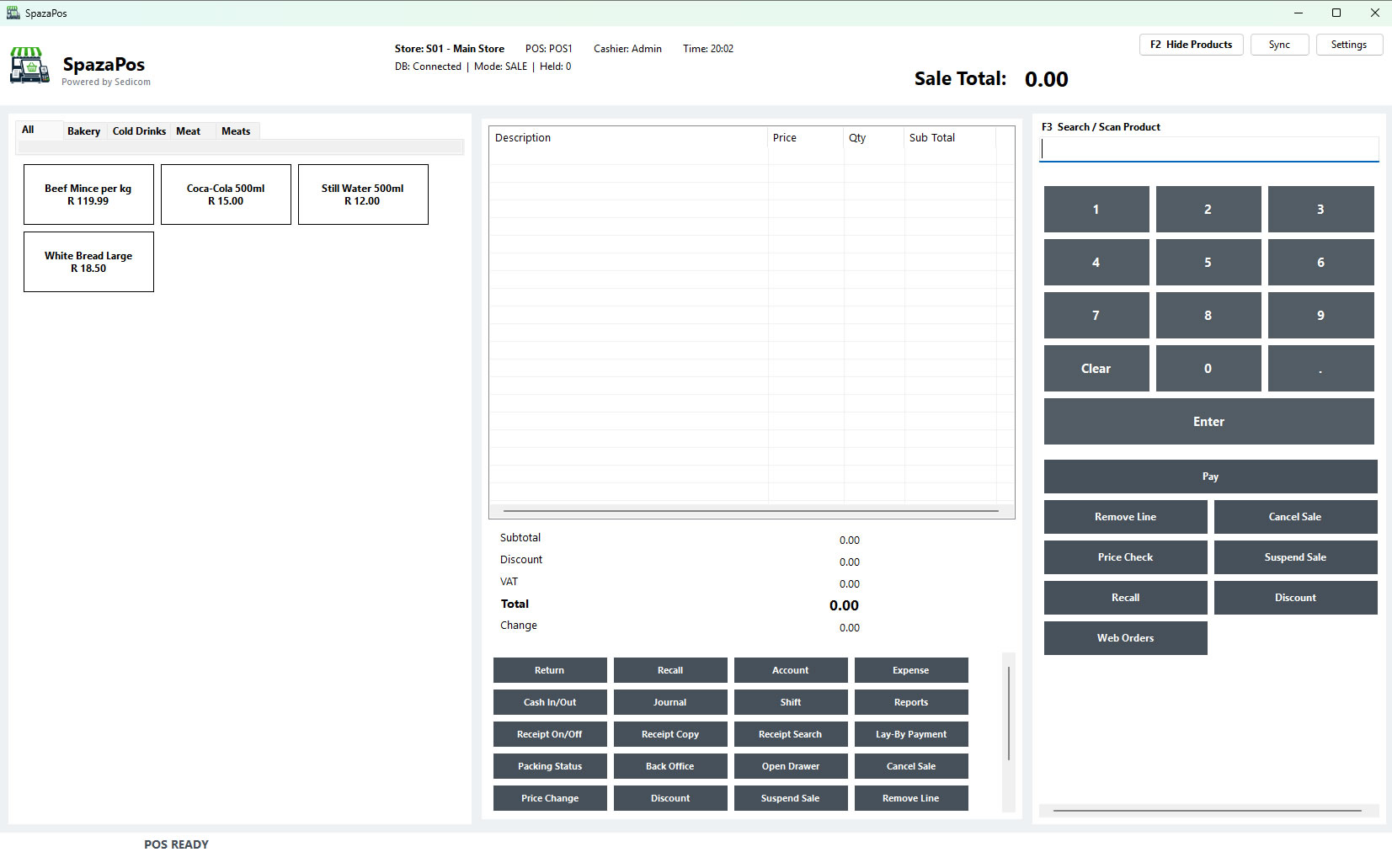
POS desktop screen
Show the main selling screen where cashiers ring up items, take payment, and complete sales with speed and confidence.
This screen is where the business serves customers, manages baskets clearly, handles held sales and returns, and keeps the checkout moving like a professional retail counter should.
DESKTOP
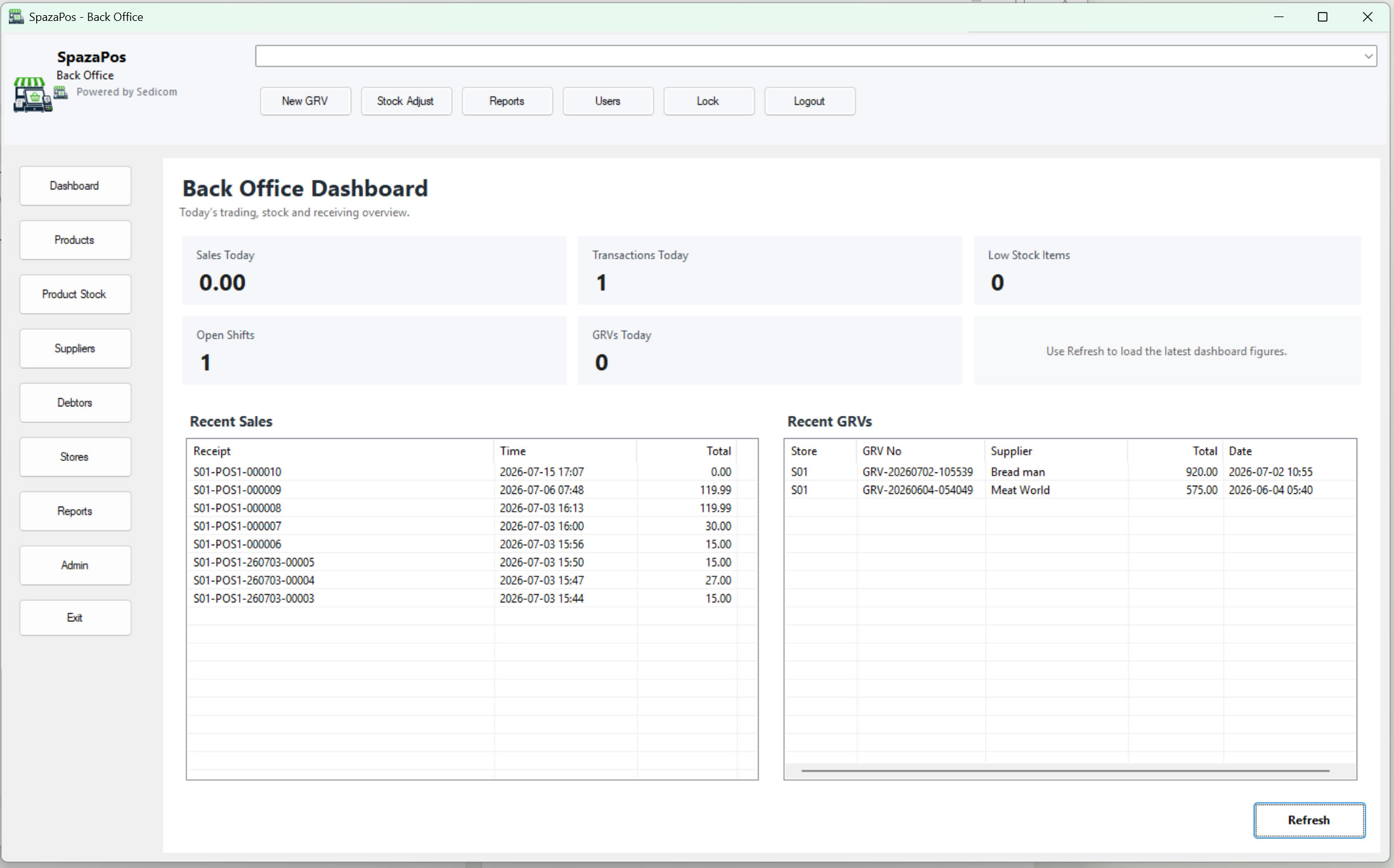
Back Office dashboard
Show the management side of the system where owners and managers keep control over stock, pricing, reports, and daily store activity.
This view should help visitors see that SpazaPOS is not only about ringing up sales. It also gives the business a proper control point for products, receiving, stock oversight, and reporting.
WEB
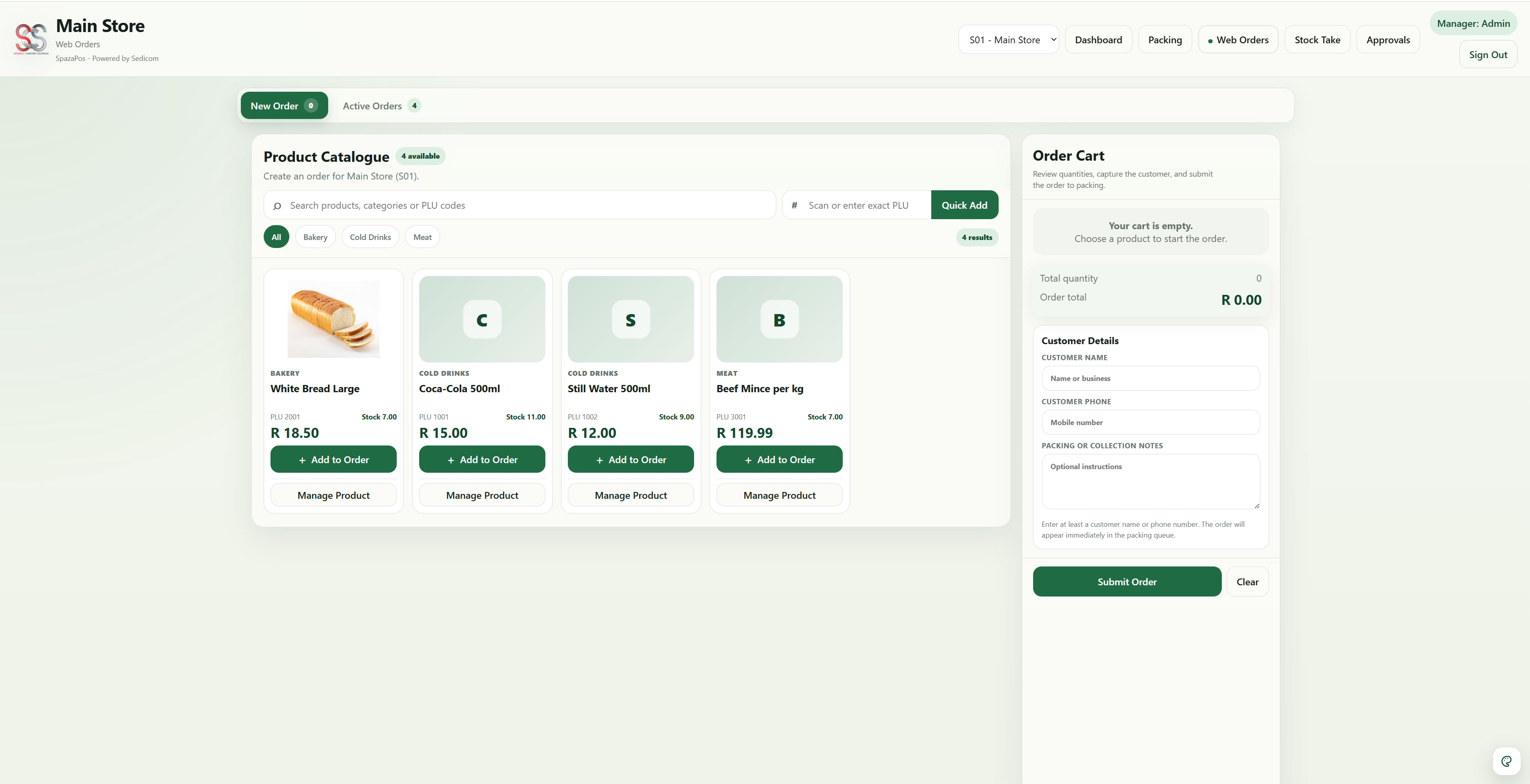
Web orders workspace
Show how staff can capture customer orders in the browser without slowing down the main till.
This area should show how order details, notes, and products are captured cleanly so the order can move through preparation and then into the till workflow when needed.
WEB
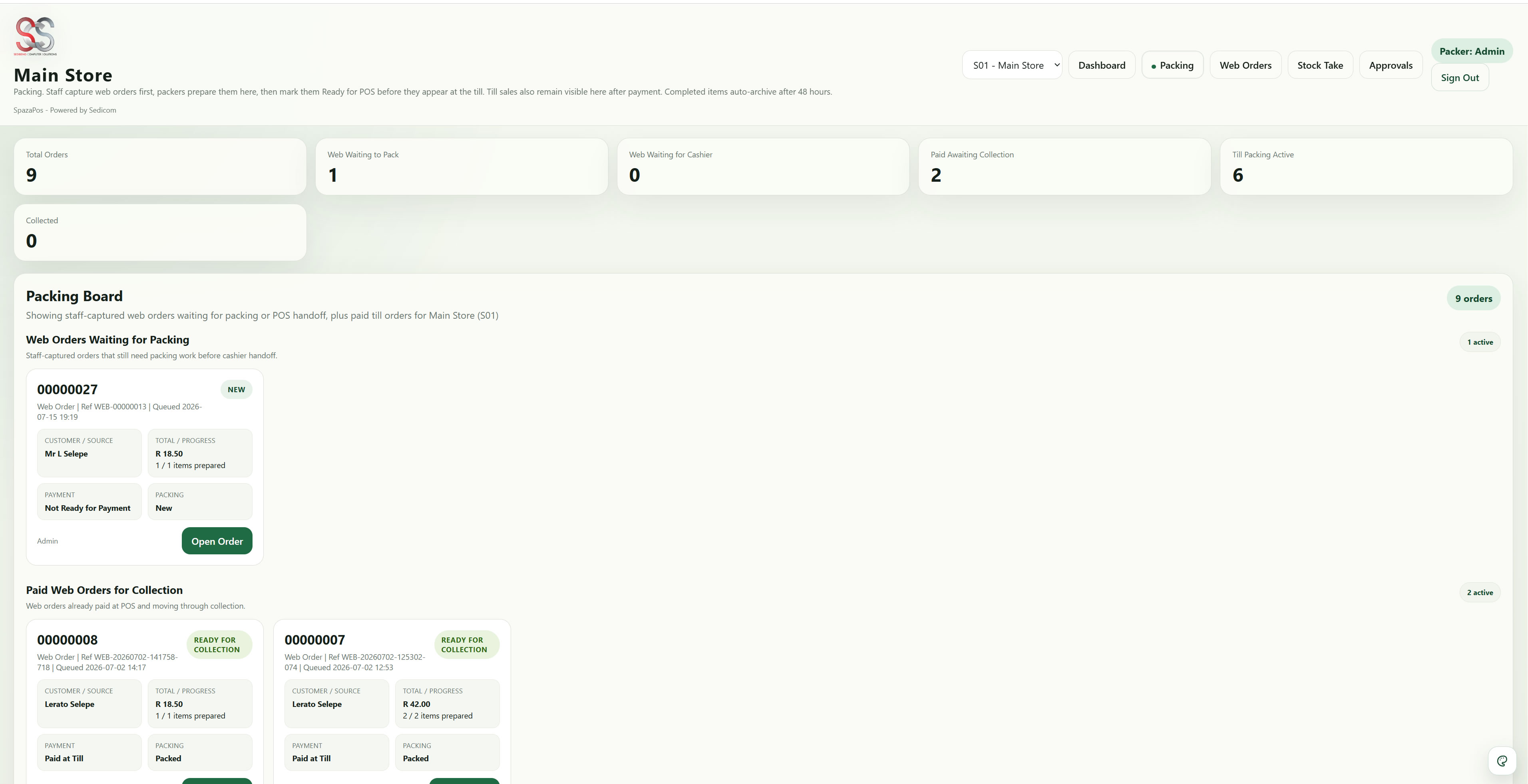
Packing board
Show the packing or kitchen-style view where the team prepares orders and keeps collection work organised.
This screen helps preparation staff see what is waiting, what is being worked on, and what is ready, without relying on the cashier to manage every step.
WEB
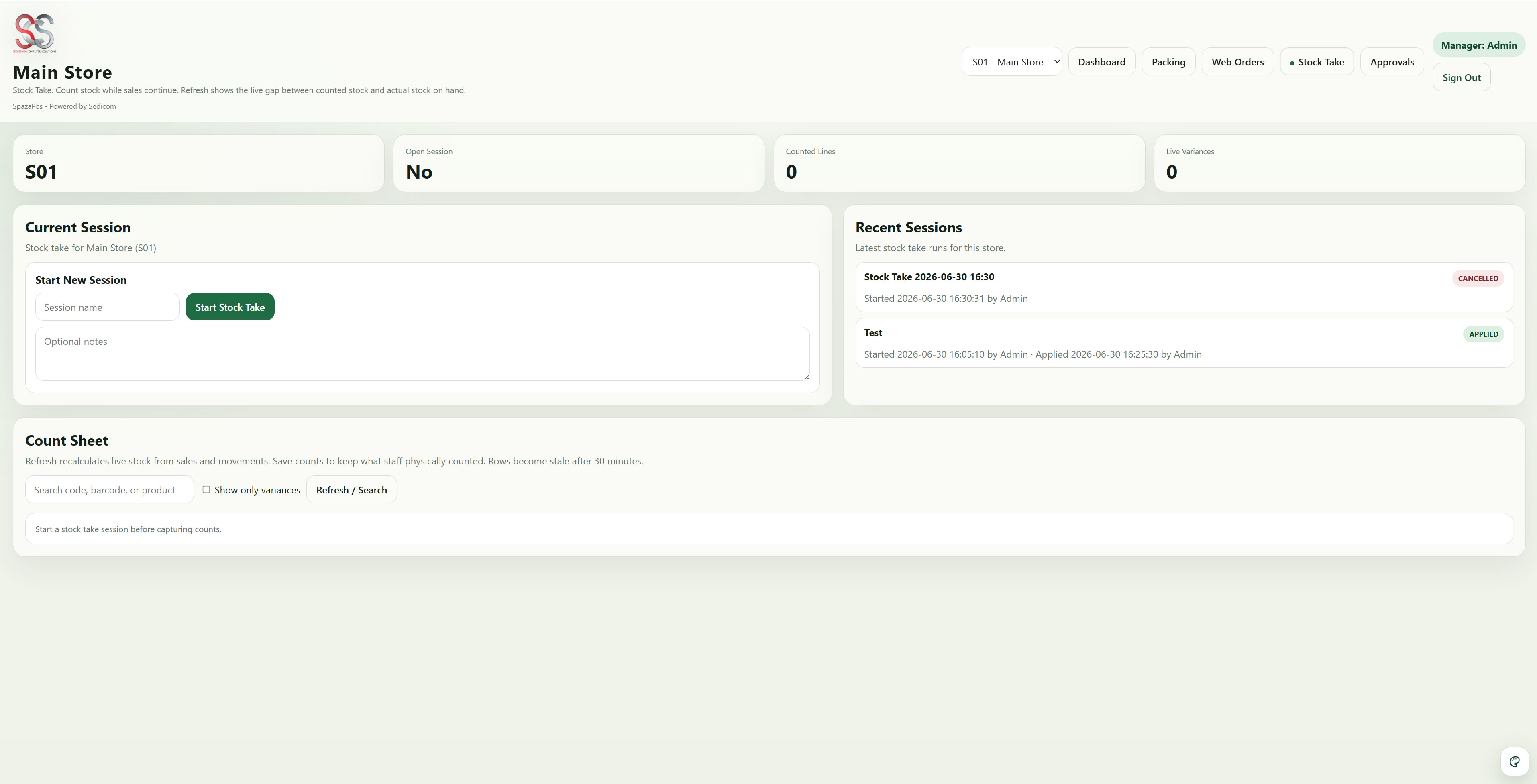
Stock take session
Show how the business counts stock properly and compares real shelf quantities with system quantities.
This screen should show that stock take is part of normal store control in SpazaPOS, helping teams catch shortages, counting mistakes, and stock problems before they become expensive.
DESKTOP
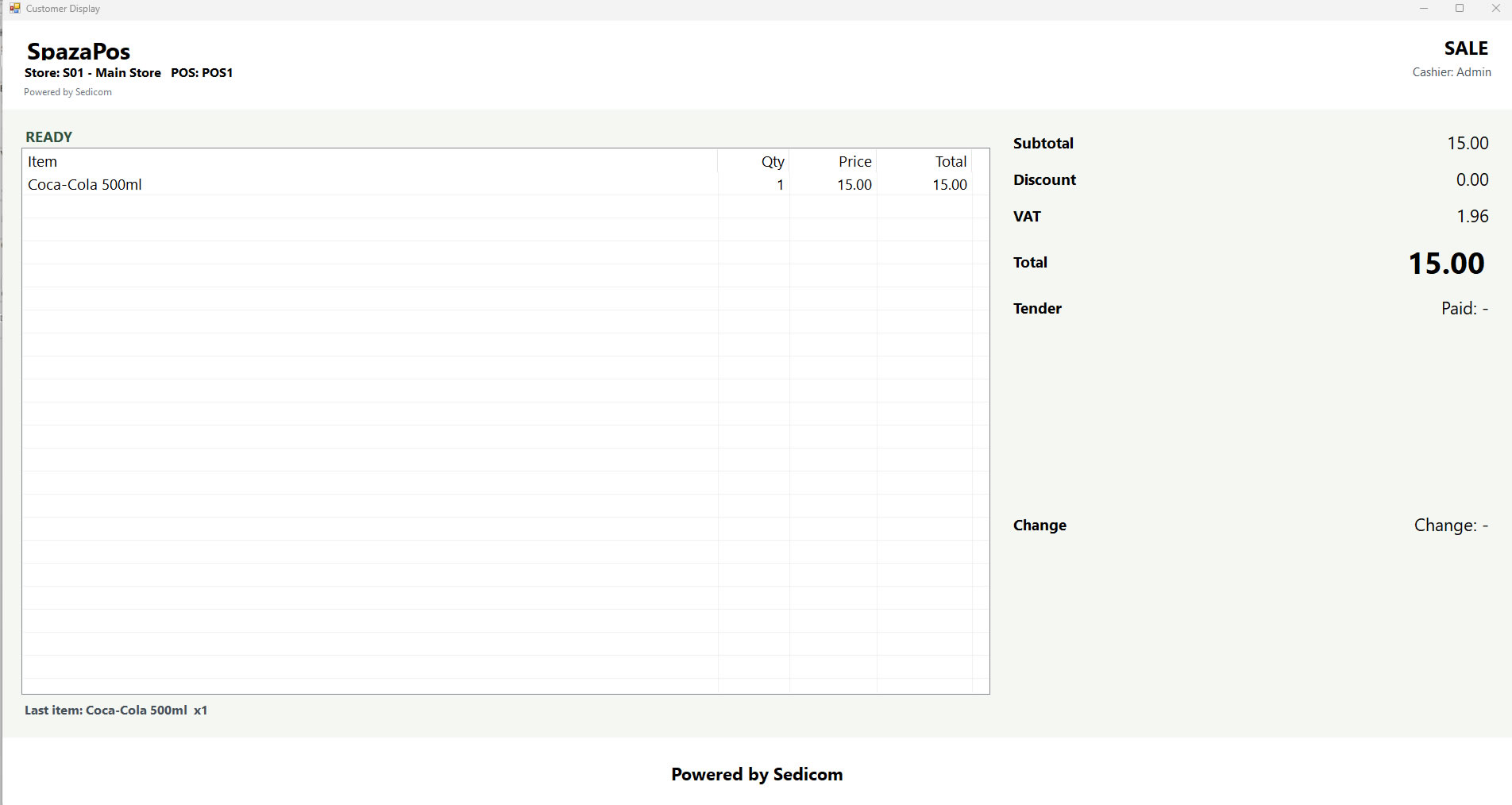
Customer display
Show the customer-facing sale view that lets shoppers follow items, totals, and payment as the cashier works.
This helps the checkout feel more transparent and professional by showing customers exactly what is happening during the sale.
DESKTOP
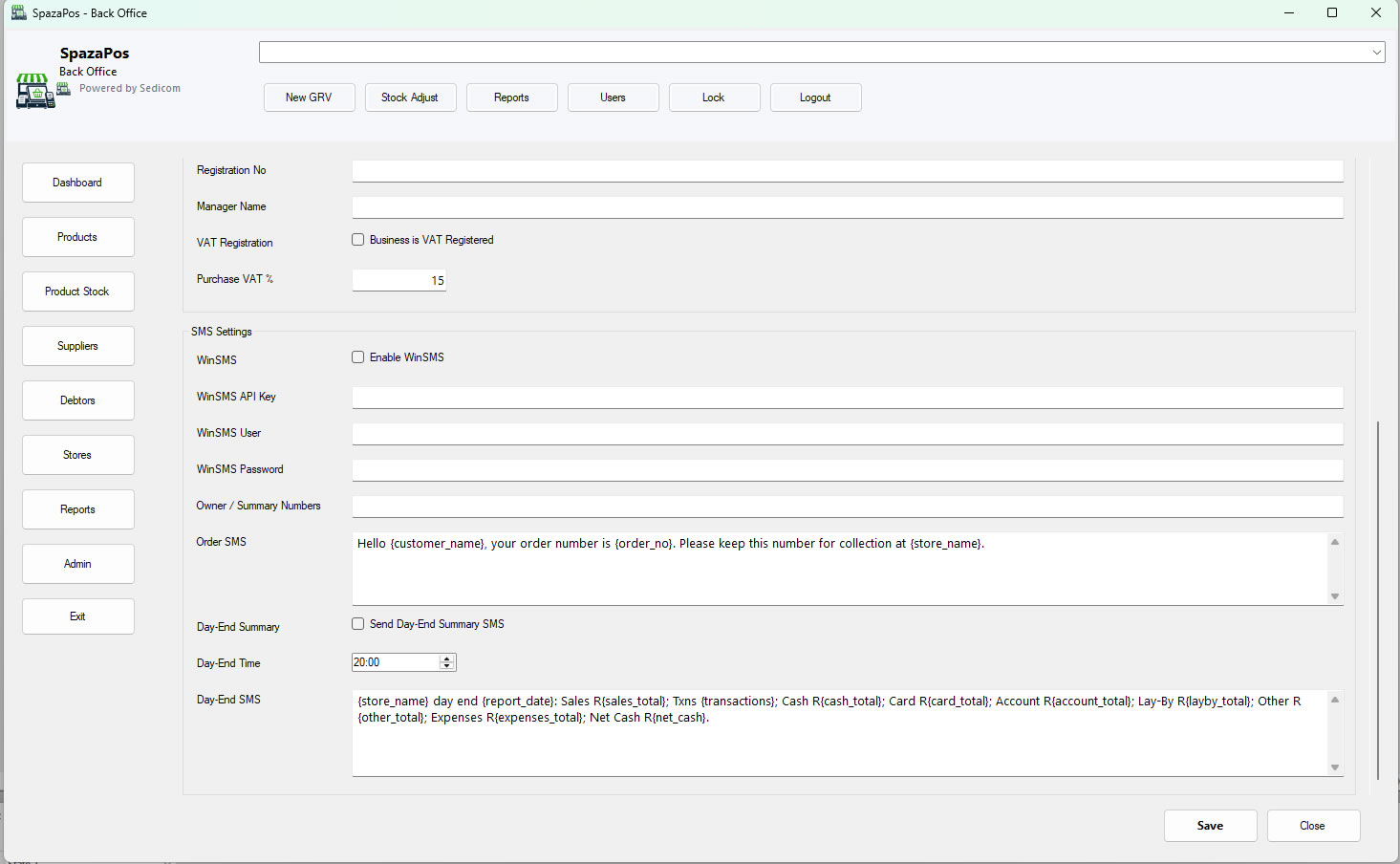
SMS setup and messaging
Show how the store can switch on SMS integration for order-reference messages and day-end summaries.
This screen can show visitors that SpazaPOS supports practical SMS communication for customer order references and management summaries when the store has WinSMS configured.
Downloads
One place for installs, versions, and release notes.
Use the installer for normal setup, choose separate POS or Back Office installs where needed, and keep the internal web modules and hosted licensing separate from the desktop software.
Windows installer
SpazaPOS_Suite.exe
Updated 2026-08-25 · 68 MB
POS and Back Office can be installed separately. Tills do not need Back Office installed, and the internal web modules are deployed separately on the store or server side.
Release library
- Latest installer: SpazaPOS_Suite.exe
- Latest ZIP package: SpazaPOS_Suite.zip
- Desktop installer files are separate from the internal web modules and the hosted licensing portal.
Licensing
Per-till licensing built for real store rollouts
SpazaPOS licensing is based on a base setup of 1 Back Office plus the first till, with additional tills licensed separately. Larger till counts can qualify for lower per-till daily rate bands. Exact public pricing can be added once the current rate sheet is finalized.
7-day trial
A trial option is available for first-time evaluation before moving onto live licensing.
Base setup
Base setup includes 1 Back Office plus the first POS or till.
Additional tills
Extra tills are licensed separately, and higher till counts can qualify for lower per-till daily rate bands.
Renewals and licensing are handled through the hosted SpazaPOS portal. The current path is manual-payment driven, using EFT, cash deposit, and Paystack once-off/manual payment flow where applicable.